Weather watch face W6.5
FutorumWeather
4.319.00 Reviews
- Version
- 1.0.0
- Installs
- 10.00K
- Age Rating
- Everyone
Screenshots
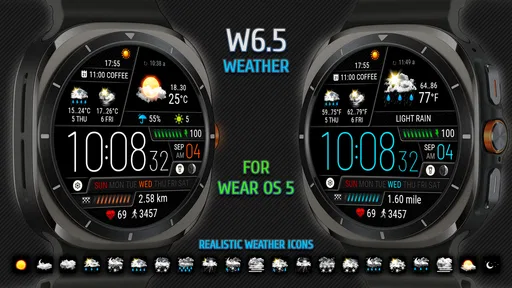
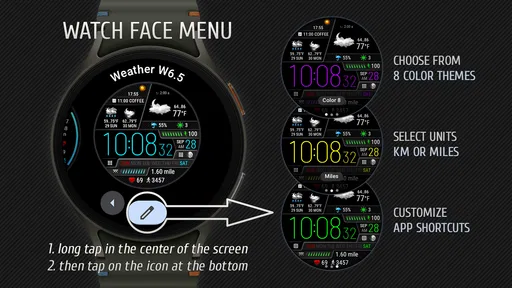
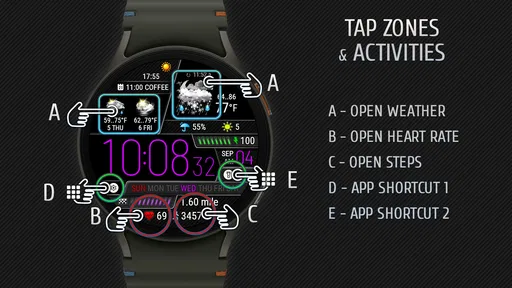
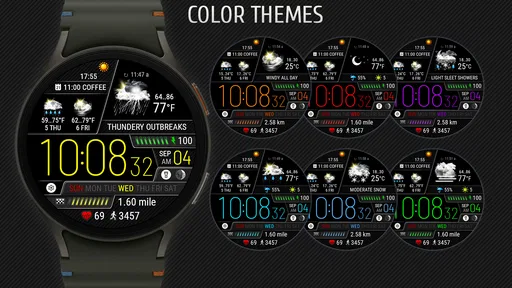
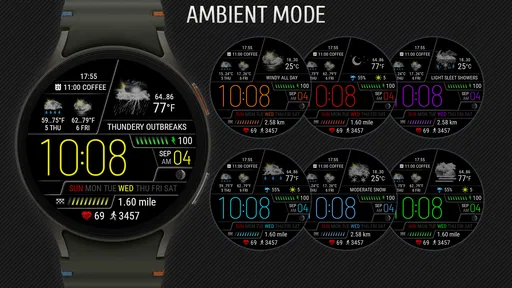
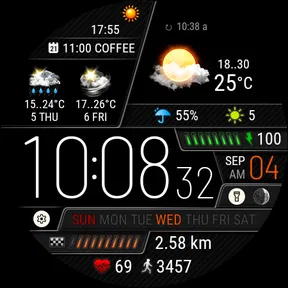
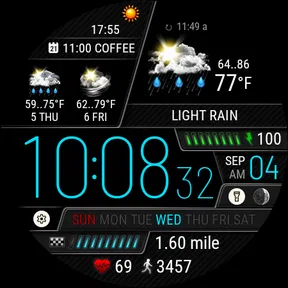
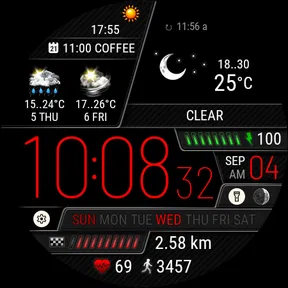
Our Review of Weather watch face W6.5
 Analysis by Appyee
I spent time with Weather watch face W6.5 as a practical Wear OS companion rather than treating it like a full weather app. That distinction matters. This is a paid weather watch face from Futorum, built for Wear OS 5 or newer, and its job is to keep weather information close to your wrist while preserving the look and usefulness of the watch face itself. It is not trying to replace a detailed forecast service on your phone.
My first impression was that the product makes the most sense for people who check conditions in short bursts: before leaving home, while walking, during a commute, or when deciding whether an outdoor plan still looks comfortable. I like that approach because a watch face should reduce friction. If I have to open an app, wait for a screen to load, and search through several panels, the advantage of having weather on my wrist is mostly gone.
How W6.5 fits into everyday Wear OS use
W6.5 is listed as a weather watch face for Wear OS 5 and later, so compatibility is the first practical filter. If your watch runs an older Wear OS release, this is not the right purchase to experiment with. For a compatible device, the appeal is straightforward: the weather becomes part of the watch face you see whenever you raise your wrist, rather than a separate destination you visit only when you remember.
I found that especially useful in situations where pulling out a phone feels excessive. Imagine leaving for work on a cool morning, noticing a change in the sky, and checking the watch before deciding whether to take a jacket. The watch face is valuable in that moment because it turns a quick glance into a decision. It is less useful when I need an hourly breakdown, a radar map, or a long-range planning view. Those tasks belong to a dedicated weather application.
The product is developed by Futorum, a name associated here with a focused Wear OS experience rather than a broad collection of unrelated mobile tools. The current version is 1.0.0, and it was released on September 4, 2024. That places the watch face at an early stage of its product life. I would judge it primarily on the experience it offers now, while keeping in mind that a first version may evolve as the developer learns how people use it on different watches.
The store rating sits at 4.3 from 286 ratings, with 19 written reviews, and the app has passed 10K+ installs. Those figures suggest that it has found a real audience, although they do not turn the watch face into a universal recommendation. A weather display can feel excellent on one watch and merely adequate on another because screen size, shape, brightness, and complications all affect readability.
It is also a paid app at $2.99. I think that price changes the question from “Is this worth trying for free?” to “Will I actually use weather information on my watch every day?” If the answer is yes, a small one-time purchase can be reasonable for a dedicated watch face. If you rarely check the weather or already have a watch face that gives you everything you need, the extra purchase is harder to justify.
The current experience: weather without opening another screen
The strongest idea behind W6.5 is immediacy. A watch face is always present, so weather information can become part of your normal glance rather than a separate habit. I prefer that for simple questions: Is it cold enough for a coat? Does the morning look dry? Should I bring something for changing conditions? The value is not in showing every possible weather detail; it is in making a small amount of useful context available at the exact moment I need it.
That simplicity also creates a trade-off. A watch face has limited space, and every weather element competes with the time, date, battery information, and any other information the design presents. A layout that looks clean may leave out detail. A layout packed with conditions may become difficult to read while walking or in dim light. I would therefore judge W6.5 less by how much information it can theoretically show and more by whether the information remains legible during a real, hurried glance.
My advice is to test it in the situations where you normally wear your watch. Look at it indoors, outdoors, in bright daylight, and while moving. A design that feels clear while choosing a watch face at home can behave differently when sunlight hits the display or when you only have a second to read it. This is one of the less obvious considerations with any weather-focused face, and it matters more than a long feature list.
Another useful way to think about it is as a “decision surface.” W6.5 can help answer whether you should adjust what you are doing, but it should not be treated as a replacement for checking detailed conditions before a hike, journey, sporting event, or other weather-sensitive activity. I would glance at the watch before leaving, then use a full weather app when the consequences of being wrong are higher.
What the release and version tell us
The release date and version give W6.5 a clear context. This is not a mature product with a long published history in the details available here; it is an early Wear OS 5+ watch face from Futorum. That does not make it a poor choice. It simply means buyers should focus on the present design and workflow instead of assuming that every preference found in older, more established watch faces will already be available.
Because the current version is 1.0.0, I would pay particular attention to how well the face fits your own watch before buying. Compatibility with the operating-system generation is necessary, but it is not the whole experience. A watch face can technically install and still feel wrong if its information is too small, too busy, or awkward to read at an angle. The best decision is to compare the face with the way you actually use your watch, not with screenshots alone.
I also see the early version as a reason to keep expectations practical. The confirmed product identity is a weather watch face, not a promise of a complete forecasting platform. I would not purchase it expecting a phone-sized weather dashboard on the wrist. I would purchase it for the convenience of having weather context integrated into the first screen I see.
That distinction helps separate current evidence from future expectations. The app’s present version establishes what is available now, while any imagined additions—more customization, broader weather detail, or deeper watch integration—remain possibilities rather than reasons to buy today. I prefer to make the purchase decision on the current experience and treat future improvement as a bonus.
How it affects people already using another watch face
For someone already happy with a standard watch face, switching to W6.5 is only worthwhile if weather is a frequent part of the daily routine. A general-purpose face may offer a broader balance of time, date, battery, activity, and calendar information. W6.5 makes a different priority: it gives weather a prominent role. That is a good exchange for a weather-conscious user, but not automatically an upgrade for everyone.
I would especially consider it if you currently open a weather app several times a day just to answer basic questions. Replacing those repeated phone checks with a wrist glance can make the purchase feel justified. The benefit is cumulative rather than dramatic. No single glance is revolutionary, but removing small interruptions from a commute, school run, dog walk, or outdoor job can make the watch feel more useful.
There is also a workflow advantage for people who use their watch as a quick filter for phone notifications. When the weather is already visible, I can decide whether a message about meeting someone outdoors requires a jacket, an umbrella, or a change of plan before reaching for the phone. That is a subtle benefit, but it is exactly the sort of practical use that a short store summary does not explain.
On the other hand, switching may be frustrating if you depend heavily on a particular existing layout or a large collection of complications. A specialized face asks you to give up some visual space for its main purpose. Before changing, I would write down the information I check most often on the current face. If weather is below battery, calendar, fitness, or notifications on that list, W6.5 may not match your priorities.
Where the watch face is less convincing
The main limitation is the natural limitation of the format: a small watch display cannot compete with a full weather app for depth. I would not use this face alone to plan a long drive, assess a storm, compare several locations, or study changing conditions over many hours. Those situations need more context than a glance-oriented design can comfortably provide.
There is also a possible readability compromise. Weather information is only useful if I can identify it quickly, and a watch face must remain attractive enough that I want to keep it installed. If the design gives too much room to weather, the time may become less dominant. If it keeps the face visually restrained, some users may feel that the weather information is not detailed enough. That balance is personal, so I would be cautious about buying if you have strict preferences for large type or a very specific information arrangement.
The price is another point to weigh honestly. At $2.99, W6.5 is not an expensive purchase, but it is still a purchase for a narrow purpose. Free alternatives may be better for someone who wants to experiment, while a more established paid watch face may be better for someone who wants extensive customization and a longer track record. W6.5 has a clearer case when simplicity and weather visibility matter more than having every possible option.
The Everyone content rating makes it broadly suitable from an age-rating perspective, but that should not be confused with universal suitability as a product. A child, an occasional smartwatch user, or someone who wears a watch mainly for notifications may gain little from a weather-first design. I would skip it if weather is something you check only once in the morning or if your existing face already gives you an equally convenient glance.
Small habits that make the purchase more worthwhile
The first habit I recommend is using W6.5 as a trigger for a second check, not as the final authority. If the glance suggests uncomfortable conditions, open a detailed weather service before committing to a long outdoor activity. This keeps the watch face in its strongest role—fast awareness—without asking it to provide information that belongs on a larger screen.
The second is to evaluate it at the moments that create real decisions. Check the face before leaving home, at the start of a lunch walk, and before travelling back in the evening. If those glances repeatedly change what you carry or wear, the face is doing useful work. If you never act on what you see, a general watch face may be a better use of the display.
The third is to consider visual priority rather than feature quantity. I would rather have weather that I can read instantly than a crowded collection of tiny indicators. This is particularly important for commuters, runners, and anyone who checks the watch while moving. The practical test is simple: can you understand the weather information without stopping, squinting, or opening another screen?
A fourth trade-off concerns routine and reliability of attention. A weather watch face is most valuable when the watch itself is already part of your daily rhythm. If you often leave the watch charging, wear it only for exercise, or silence its display for long periods, the convenience is reduced. In that case, a phone widget or notification-based weather tool may fit better because it meets you where you already look.
Who should choose W6.5, and who should pass?
I would recommend W6.5 to a Wear OS 5+ owner who wants weather visible on the main watch screen and prefers a focused experience over a general-purpose design. It is a sensible match for people who make frequent small outdoor decisions: cyclists checking conditions before setting off, walkers deciding what to wear, commuters watching the morning change, or anyone who dislikes unlocking a phone for a basic weather glance.
I would be more cautious for users who want deep customization, extensive forecasting, or a watch face that serves many unrelated purposes equally well. A dedicated weather face is not automatically better than a flexible face with weather complications. The flexible option may win if you need calendar appointments, health information, battery status, and weather all visible in a carefully controlled layout.
I would also skip it if your watch does not meet the Wear OS 5+ requirement, if you rarely look at weather, or if you expect the watch face to replace a full weather application. Those are not minor mismatches; they go directly against the product’s role. Paying for a specialized face only makes sense when its specialization matches your daily behavior.
What I would watch as the product develops
With version 1.0.0 as the current release, I would watch for how Futorum develops the experience over time, especially around the practical balance between readability, weather detail, and the rest of the watch face. I would also look for improvements that make the face easier to live with across different Wear OS watches, because the same concept can feel very different on a compact display compared with a larger one.
That is not a promise that particular changes will arrive. It is simply the sensible way to assess an early product: enjoy what is already useful, and treat future refinement as uncertain. The current case for W6.5 is its immediate weather-first workflow, not an imagined roadmap.
After using it, my view is positive but specific. W6.5 is best understood as a quick weather decision tool built into your watch face, not as a miniature forecasting suite. The 4.3 average and growing install base show that it has attracted interest, while the early version means personal fit still matters more than reputation. For the right Wear OS user, the $2.99 price is reasonable because it turns repeated weather checks into effortless glances. For everyone else, a flexible watch face or a dedicated weather app may be the smarter choice.
If you already wear a compatible watch throughout the day and weather affects what you do, I can see myself recommending Weather watch face W6.5 to you. I would install it with realistic expectations, test its readability in your normal surroundings, and keep a full weather app available for serious planning. Used that way, it offers a focused convenience rather than pretending to be something larger.
Verdict
Strengths of Weather watch face W6.5
- Clear weather data is easy to read at a quick glance.
- Useful layout combines time, date, and forecast details.
- Weather-focused design suits outdoor activities and daily planning.
- Supports a practical smartwatch experience without opening a phone app.
- Compact information display helps reduce unnecessary screen navigation.
Limitations of Weather watch face W6.5
- Weather accuracy depends on the connected phone and data provider.
- Frequent updates may increase smartwatch battery consumption.
- Small text can be difficult to read on compact watch displays.
- Some customization options may require paid access or a specific app version.
- Compatibility can vary between Wear OS devices and watch configurations.
Other Releases by Futorum
View All
Weather watch face W5.5
Weather4.1
Similar Picks in This Category
View All
Weather - By Xiaomi
Xiaomi Inc.4.1

Weather & Radar Forecast
WetterOnline4.8

Weather
OneLouder Apps4.6

AccuWeather: Weather Radar
AccuWeather3.6

The Weather Channel - Radar
The Weather Channel4.6

1Weather Forecasts & Radar
OneLouder Apps4.3
Frequently Asked Questions
What is Weather watch face W6.5?
Weather watch face W6.5 is a customizable watch face designed for compatible Wear OS smartwatches. It focuses on presenting weather information, time, date, and other practical details directly on the watch screen. Its appearance may vary depending on the selected color, layout, and complication settings, allowing users to create a display that matches their daily needs and personal style.
Which smartwatches are compatible with Weather watch face W6.5?
Before downloading Weather watch face W6.5, check that your smartwatch uses a supported version of Wear OS and that the watch face is available for your specific device. Compatibility can differ between watch models, manufacturers, and operating-system versions. Some features may also depend on the watch’s sensors, installed companion apps, or the permissions granted during setup.
What information can Weather watch face W6.5 display?
The watch face is intended to show essential information such as the current time, date, and weather conditions, with additional details depending on the available layout and complications. Users may be able to view items such as temperature, weather icons, battery status, steps, or other system data. The exact information depends on device support and configuration.
Does Weather watch face W6.5 need location or weather permissions?
Weather watch face W6.5 may require access to location, internet connectivity, or a weather-data provider to update local conditions. Without the relevant permissions, the weather section could remain outdated, show incomplete information, or require manual refreshes. For privacy, review the requested permissions during installation and enable only those necessary for the weather and watch-face features you plan to use.
Can I customize Weather watch face W6.5, and will it affect battery life?
Customization options may include colors, display styles, complications, weather units, and other visual preferences, depending on the version installed and the capabilities of your smartwatch. More frequent weather updates, bright always-on settings, animations, and active complications can increase battery consumption. If battery life becomes a concern, reduce update frequency and disable information you do not regularly need.
